
Slack is where your team talks. It is not where your GDPR programme lives. Under the UK GDPR Article 28, your organisation is the controller when you decide what personal data goes into Slack, who can see it, and how long it stays. Slack processes that data on your instructions. That split is the starting point for every control you put in place.
Slack’s own GDPR commitment page states that it offers a Data Processing Addendum with standard contractual clauses, and that this DPA is “available to all customers regardless of the Slack plan they are using.” Slack also lists import and export tools, a profile deletion tool, data residency options, and retention settings. Those features help. They do not replace your contract paperwork, your retention decisions, or staff training.
Controller and processor: what the law expects
ICO guidance on contracts is direct: “Whenever a controller uses a processor to process personal data on their behalf, a written contract needs to be in place between the parties.” The contract must cover the subject matter and duration of processing, the nature and purpose of processing, the types of personal data involved, and the controller’s obligations and rights.
For Slack, that contract is the DPA. Before you rely on it, a compliance lead should read it against your actual setup: where your workspace data is stored, whether you use Slack Connect with external organisations, which apps are installed, and whether any messages contain special category data or children’s data. Article 28(3) lists the processor obligations that must appear in that contract, including processing only on documented instructions, confidentiality duties, security measures, sub-processor controls, and deletion or return of data at the end of the service.
The diagram below shows the basic data-flow split: your organisation decides purpose and retention as controller; Slack processes messages on documented instructions; sub-processors sit behind Slack under the DPA chain.
flowchart LR
    Org[Your organisation
Data controller] -->|Documented instructions| Slack[Slack
Data processor]
    Slack -->|Sub-processor agreements| Sub[Sub-processors]
    Org -->|ROPA entry| Record[Records of processing]
Controller versus processor flow for a typical Slack workspace.
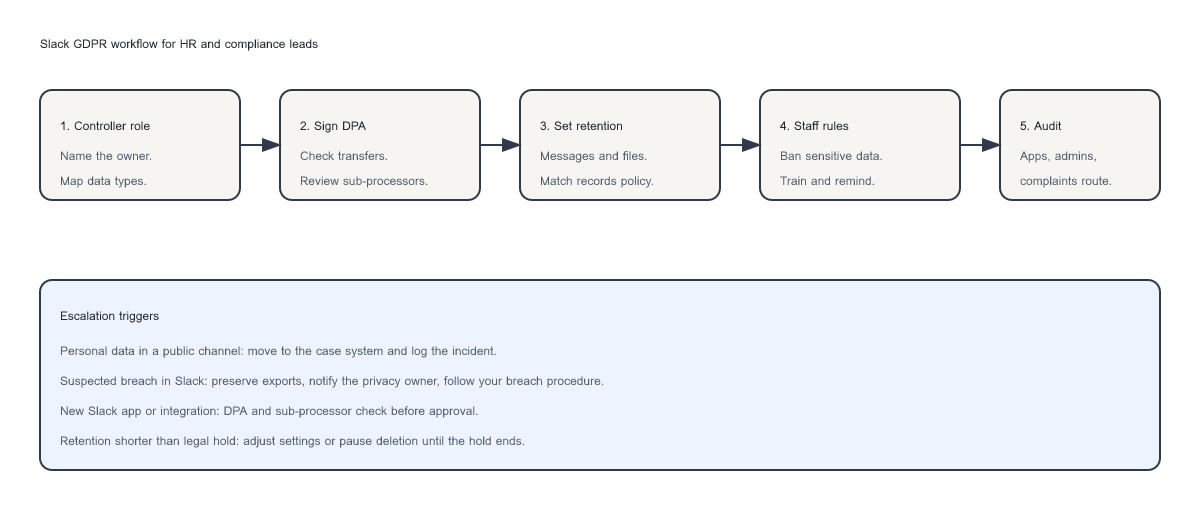
Slack GDPR workflow
Use this workflow as a board-level checklist. Each step should have a named owner and a date in your records of processing.
Retention, transfers, and quoted Slack detail
Retention is where many Slack setups drift out of alignment with records policy. Slack’s retention settings page warns that “Data deleted according to your retention setting is permanent. Adjust these settings with care.” On paid plans, workspace owners can choose to keep all messages, keep messages without tracking edits, or set a custom deletion timeline for public channels, private channels, and direct messages. File retention is configured separately from message retention.
For international transfers, Slack’s GDPR page says it offers “European Union Model Clauses, also known as Standard Contractual Clauses” through its DPA, and that Slack participates in the EU-U.S. Data Privacy Framework through Salesforce. Your job is to confirm which mechanism covers your workspace, document that choice in your transfer assessment, and re-check when Slack publishes sub-processor updates.
What HR and compliance leads should do this quarter
- Confirm the DPA is executed and filed with your vendor register. Note the signatory, date, and plan tier.
- Map Slack use cases against your record of processing activities: customer support, HR queries, incident response, marketing approvals, and executive updates are not the same risk profile.
- Set retention to match policy, not Slack defaults. If legal holds apply, document how you pause deletion.
- Restrict admin rights, enforce MFA, and review channel membership for teams handling personal data.
- Audit integrations monthly. Remove apps with no owner, no DPA trail, or no business case.
- Run a tabletop exercise for a complaint or breach raised first in Slack. The message should reach your formal route within one working day.
The policy only works if behaviour matches it. Our article on operationalising privacy policies covers the gap between a polished document and day-to-day practice.
Example-only document wording
Disclaimer: The blocks below are illustrative examples only. They are not legal advice. Every organisation must make its own analysis and obtain its own legal advice before adopting or publishing any policy wording.
Privacy notice pointer (example only)
Example wording for a staff-facing privacy notice section on collaboration tools: “We use Slack for internal business communications. Messages may include your name, work email address, job-related comments, and files you upload. Slack acts as our data processor under a Data Processing Addendum. We configure retention settings for messages and files in line with our records management policy. We do not use Slack as our system of record for customer complaints, HR case files, or payment card data. For more detail, see our full privacy notice and our acceptable use policy.”
Employee Slack-use policy bullets (example only)
- Do not post full customer records, national insurance numbers, medical information, or unredacted ID documents in any Slack channel.
- Use private channels for operational discussions that include personal data, and keep membership to people who need access for their role.
- Do not use Slack as the only record of a data subject complaint. Log it in the designated complaints system and reference the case number in Slack if needed.
- Report suspected data breaches to the privacy team immediately. Do not delete messages before you are told to.
- Do not install Slack apps or connect external services without IT and privacy approval.
Vendor and DPA checklist (example only)
- Signed DPA on file, with version date and authorised signatory.
- Transfer mechanism documented (standard contractual clauses, UK IDTA, or other approved route).
- Sub-processor list reviewed in the last 12 months, with a named internal reviewer.
- Data residency setting recorded if your workspace uses a specific region.
- Retention settings for messages, files, canvases, and lists documented and aligned to records policy.
- Admin account list and MFA status reviewed quarterly.
- Incident response steps include Slack export and preservation where needed.
Complaints, breaches, and records
If staff raise issues in Slack, those messages need a named owner and a route into your formal complaints process. ICO guidance on the accountability principle expects you to demonstrate compliance, not just assert it. Slack exports and retention settings are part of that evidence trail.
Use this decision tree when a Slack message may contain personal data that needs more than routine handling. It covers special category data, public-channel exposure, legal holds, and possible breaches.
flowchart TD
    Start([Slack message flagged]) --> Type{Special category data?}
    Type -->|Yes| Esc1[Escalate to privacy lead]
    Type -->|No| Public{In public channel?}
    Public -->|Yes| Esc2[Review, redact, or move]
    Public -->|No| Hold{Legal hold?}
    Hold -->|Yes| Esc3[Preserve and notify legal]
    Hold -->|No| Breach{Possible breach?}
    Breach -->|Yes| Esc4[Start breach process]
    Breach -->|No| OK[Apply retention policy]
Escalation decision tree for Slack message content.
Our guide to the UK data protection complaints procedure sets out what organisations need before a complaint lands in the wrong inbox.
Manager checklist
- Record Slack in your processing activities and name the internal owner.
- File the executed DPA and your latest transfer assessment.
- Align message, file, canvas, and list retention with records policy.
- Publish staff rules on what must never be posted in Slack.
- Limit channel creation, app installation, and workspace admin rights.
- Test a complaint or breach scenario that starts in Slack.
Staff who live in Slack need short, repeated reminders. A one-off onboarding mention is not enough.
For a practical baseline across the wider team, the GDPR Refresher Training Course covers the core rules on personal data handling, including what belongs in everyday collaboration tools.


